The best USB microphone for podcasting depends on your room. For untreated home rooms, start with the Shure MV6 Gen 2 for its adjustable denoiser and Auto Level. Choose the Elgato Wave:3 MK.2 for Wave Link workflows, or the RØDE NT-USB Mini for a compact desk setup.
The best USB microphone for podcasting is the one that suits your room, your voice and how you record, not the one with the longest feature list. This guide is for solo hosts, remote interview shows and video podcasters who record at a desk and want one plug-in microphone without an audio interface. Our defensible recommendation: if you record in an ordinary, untreated home room, start with the Shure MV6 Gen 2, because its manufacturer-listed adjustable denoiser, Auto Level and EQ give you the most tools for imperfect spaces. If you already use Elgato software, or you need a small desk footprint, the other two picks may fit better.
We compare three microphones using manufacturer documentation only. We did not run listening tests, and nothing here is a measured result. You can read more about that process in how we research gear. If your main use is live streaming rather than recorded shows, our USB microphone for streaming guide covers the same models from a streamer’s angle; this article focuses on podcast-specific decisions.
Quick picks for podcasters
| Microphone | Best for | Key podcast feature | Main limitation |
|---|---|---|---|
| Shure MV6 Gen 2 | Untreated or noisy home rooms | Adjustable denoiser, Auto Level and 5-band EQ | New generation; older MV6 listings differ |
| Elgato Wave:3 MK.2 | Hosts using Wave Link software | Cardioid condenser with onboard DSP and Auto Gain | Condenser pickup rewards a quiet room |
| RØDE NT-USB Mini | Small desks and simple setups | Built-in pop filter and 360-degree swing mount | Fewer verified on-mic controls |
Older roundups often lead with microphones from earlier product generations. We only include models whose current manufacturer documentation we could verify, so this list is short on purpose.
How to choose the best USB microphone for podcasting
Podcasting puts different demands on a microphone than gaming or streaming. You usually speak for longer, you edit afterwards, and listeners hear your voice with nothing else to distract them. Small problems such as room echo, plosive pops or uneven volume become obvious in headphones. Choosing the best USB microphone for podcasting means weighing four things.
Your room matters more than the spec sheet
A bare room with hard walls reflects sound back into the microphone. A cardioid condenser like the Elgato Wave:3 MK.2 captures detail well, which also means it can capture that reflection and background noise. If you cannot quiet the room, onboard processing such as a denoiser helps, though manufacturer claims about processing are not independent measurements.
Placement and mounting
Consistent distance from mouth to microphone gives consistent volume. A mic that sits too far away on a desk picks up more room and keyboard noise. Look at how each microphone mounts: the RØDE NT-USB Mini has a detachable magnetic desk base and a swing mount, while the Shure MV6 Gen 2 ships with a desktop stand according to Shure’s announcement.
Monitoring and mute
Headphone monitoring lets you hear problems while you record rather than after. Tap-to-mute is handy for coughs and interruptions during live-to-tape interviews. Both the Shure MV6 Gen 2 and Elgato Wave:3 MK.2 list tap-to-mute and headphone monitoring.
Software and workflow
USB mics often pair with manufacturer software for processing and mixing. That is useful if you like it and a burden if you prefer to process audio in your editor. Decide whether you want processing on the microphone, in companion software, or later in post.
The three USB podcast microphones in detail
Each pick below is the best USB microphone for podcasting for a specific kind of host. Read the limitations as carefully as the strengths.
Shure MV6 Gen 2

The Shure MV6 Gen 2 is a USB-C microphone with a 3.5 mm headphone output for monitoring and tap-to-mute. Its podcast-relevant strength is processing: Shure lists adjustable Auto Level, an adjustable real-time denoiser and a 5-band EQ. Shure’s announcement also specifies a 2-meter USB-C cable and a desktop stand.
Who should choose it: hosts recording in a spare bedroom, an open-plan home or anywhere with fans, traffic or household noise. Being able to adjust the denoiser, rather than switch it on or off, matters for voice work because heavy noise reduction can make speech sound processed. Auto Level helps when you lean back during a long conversation.
Limitations: Shure announced the Gen 2 on September 30, 2026, and older MV6 pages describe a 1-meter cable. Listings that just say “MV6” may be the earlier model, so confirm “Gen 2” before buying. Shure markets the MV6 line toward gaming, and we have no independent measurement of how well the denoiser works on speech. Treat it as a useful tool, not a replacement for a quieter space.
Elgato Wave:3 MK.2

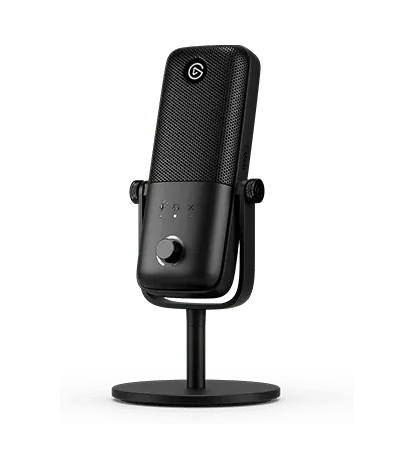
The Elgato Wave:3 MK.2 is a USB condenser microphone with a cardioid pickup pattern. Elgato lists onboard DSP, Auto Gain, tap-to-mute and headphone monitoring, plus integration with its Wave Link software for routing and mixing audio on the computer.
Who should choose it: podcasters who also stream, or who want software control over levels and sources in one place. If you record video podcasts and already use other Elgato gear, keeping your audio in the same software can simplify setup. A cardioid condenser in a reasonably quiet, softened room is a common choice for spoken word.
Limitations: Condenser microphones generally pick up more of the room, so a hard, echoey space will show. Elgato’s product page compares the original Wave:3 with the MK.2, and the two should not be treated as identical. Check that the listing names the MK.2 and do not assume bundled accessories match the original model. Wave Link is a benefit only if you are comfortable running companion software during recording.
RØDE NT-USB Mini

The RØDE NT-USB Mini is a compact USB microphone with a built-in pop filter, a detachable magnetic desk base and a 360-degree swing mount. RØDE says it has built-in DSP for processing through RØDE Connect.
Who should choose it: beginners and hosts with limited desk space. The built-in pop filter addresses plosives, the bursts of air from “p” and “b” sounds that are common in close speech, without an add-on screen. The swing mount and detachable base give you options for positioning the microphone closer to your mouth.
Limitations: Our verified facts do not cover on-mic controls such as tap-to-mute or a headphone output for this model, so check the current spec sheet if those matter to you. The NT-USB Mini is a different product from the NT-USB and the NT-USB+; listings and older reviews sometimes mix them up. Confirm the exact name before ordering.
Comparison: which USB podcast mic fits your setup?
| Feature | Shure MV6 Gen 2 | Elgato Wave:3 MK.2 | RØDE NT-USB Mini |
|---|---|---|---|
| Connection | USB-C | USB | USB |
| Verified pickup details | Not specified in our facts | Condenser, cardioid | Not specified in our facts |
| Headphone monitoring | Yes, 3.5 mm | Yes (connector not specified in our facts) | Check current specs |
| Tap-to-mute | Yes | Yes | Check current specs |
| Built-in processing | Auto Level, denoiser and 5-band EQ | Onboard DSP | Built-in DSP for RØDE Connect |
| Level control | Adjustable Auto Level | Auto Gain | Not specified in our facts |
| Noise processing | Adjustable real-time denoiser | Not specified in our facts | Not specified in our facts |
| Plosive handling | Not specified in our facts | Not specified in our facts | Built-in pop filter |
| Mounting | Desktop stand included | Check bundle for MK.2 | Magnetic base, 360-degree swing mount |
| Software | Not specified in our facts | Wave Link | RØDE Connect |
“Not specified” means our verified manufacturer facts did not establish the detail, not that the feature is missing. When something matters to your decision, check the manufacturer’s current page for the exact generation.
Compatibility checklist before you buy
Run through this list before ordering any USB microphone for a podcast.
- Exact generation: confirm “Gen 2”, “MK.2” or “Mini” is in the product name. Earlier versions have different specs.
- Free port: make sure your computer has a suitable USB port. On thin laptops with few ports, a hub may help; our USB-C hub guide explains what to check about shared bandwidth.
- Cable reach: measure from your seating position to the computer. The MV6 Gen 2 cable is 2 meters per Shure; older MV6 units listed 1 meter.
- Software support: if you plan to use Wave Link or RØDE Connect, confirm the app supports your operating system version. For the Shure, check Shure’s current documentation for any software support.
- Recording app: check whether your recording or call software accepts the microphone as an input and, for multiple hosts, whether it can record separate tracks.
- Headphones: the Shure MV6 Gen 2 monitors through a 3.5 mm output, so wired headphones with a 3.5 mm plug suit it. For the Elgato Wave:3 MK.2, check Elgato’s MK.2 spec sheet for the monitoring connector before choosing headphones.
- Phone recording: we have not verified phone compatibility for these models; check manufacturer support before planning to record on a phone.
- Video: if your show goes on video, plan the camera and microphone together so the mic does not block your face. Our webcam guide covers framing and USB bandwidth.
Worked example: a two-host remote podcast
Here is how the best USB microphone for podcasting choice plays out for a common setup: two co-hosts in different homes recording a weekly interview show.
- Match the mic to each room. Host A records in a carpeted study with a bookshelf. A cardioid condenser like the Elgato Wave:3 MK.2 is reasonable here. Host B records at a kitchen table with a fridge and street noise, so the Shure MV6 Gen 2 with its adjustable denoiser is the more cautious choice.
- Record locally on both sides. Each host records their own microphone on their own computer while talking over a call. Local files avoid internet dropouts in the final audio. Afterwards, one person lines up both tracks in an editor.
- Wear headphones. If Host B hears Host A through speakers, the microphone will capture that sound and create echo. Both hosts use their microphone’s headphone monitoring so they hear themselves and each other without speakers.
- Set levels once, then leave them. Each host speaks at normal conversational volume and adjusts gain or Auto Level so peaks never hit the maximum. Changing settings mid-episode makes editing harder.
- Use processing lightly. Host B starts with a low denoiser setting and raises it only if background noise is distracting. Overprocessed voice can sound thin or warbly, and that cannot be undone in editing.
- Back up the raw files. Keep unprocessed recordings on a second drive before editing. Our external SSD guide explains why a single drive is not a complete backup plan.
The point of the example: two different microphones on one show are fine. Consistency comes from placement, levels and technique more than from matching hardware.
Common mistakes with USB podcast mics
- Buying for the spec sheet instead of the room. The best USB microphone for podcasting in a treated studio may be the wrong one for a bare apartment. Start from your noise problem.
- Sitting too far away. Distance adds room sound. Bring the microphone closer and lower the gain instead of raising the gain from across the desk.
- Turning every processor to maximum. Denoisers, Auto Gain and EQ help when used gently. Stacked heavy processing can make voices sound unnatural.
- Mixing up generations. MV6 versus MV6 Gen 2, Wave:3 versus Wave:3 MK.2, and NT-USB Mini versus NT-USB all have different details.
- Ignoring desk noise. Typing, mouse clicks and bumps travel into a desk-mounted mic. Keep the mic off the surface you are typing on where possible, and route cables tidily; see our desk cable management guide.
- Skipping a test recording. Record a minute of speech and a minute of silence before every session, then listen in headphones. It catches most setup problems before the guest arrives.
For more audio and camera coverage, browse the streaming and audio section or our full list of PC buying guides. If you are still deciding on the best USB microphone for podcasting, pick the model that solves your biggest room problem first, then refine your technique: that sequence gives most hosts better results than chasing extra features.
Frequently asked questions
Is a USB microphone good enough for a podcast?
Yes, for most solo shows and remote interviews. A USB microphone combines the capsule, preamp and converter in one device, so you plug it into a computer and record without an audio interface. The trade-off is flexibility: XLR setups make it easier to add more microphones and upgrade parts separately. If your show is one host per computer, USB is a sensible starting point.
What is the best podcast mic for a noisy room?
Of the three models we verified, the Shure MV6 Gen 2 lists the most relevant tools: an adjustable real-time denoiser, adjustable Auto Level and a 5-band EQ. Those features are manufacturer-listed and their effectiveness has not been independently measured. No microphone removes every noise, so close placement, a quieter recording time and soft furnishings still matter more than any single setting.
Can two hosts use two USB microphones on one computer?
Sometimes, but it is not automatic. Many recording apps accept only one input device at a time, so two USB mics may need to be combined at the operating system level or handled by software that supports multiple devices. Before buying two mics for one computer, confirm your recording software and operating system can record both as separate tracks.
Do I need headphones when podcasting with a USB mic?
Headphones are strongly recommended. They let you hear your own voice, catch problems like clipping or hum while recording, and stop a guest's voice from leaking out of speakers into your microphone, which causes echo. The Shure MV6 Gen 2 offers 3.5 mm monitoring, and the Elgato Wave:3 MK.2 lists headphone monitoring; check Elgato's MK.2 spec sheet for the connector type.
Do these USB podcast mics work with an iPhone?
Our verified manufacturer facts do not confirm phone compatibility for any of these three models, so we do not promise it. If you plan to record on an iPhone, check the current manufacturer support page for your exact model and generation, and confirm the cable or adapter you need before buying. Desktop and laptop recording is the safer assumption.
Research-led guides for better PC setups. Read how we select and check gear.