A good microphone for gaming is one you can mute fast, monitor in your headphones and control against keyboard noise. For noisy rooms, start with the Shure MV6 Gen 2; for Wave Link streaming, the Elgato Wave:3 MK.2; for a small desk, the RØDE NT-USB Mini.
A good microphone for gaming does three jobs well: it makes your voice clear in Discord or party chat, it keeps keyboard and mouse clicks from swamping your teammates, and it lets you mute in a hurry. This guide is for PC players who have outgrown a headset boom mic, part-time streamers who also play competitively, and anyone working with a crowded desk. If your room is noisy and you want the most control over voice processing, start with the Shure MV6 Gen 2. If you already stream with Elgato software, the Elgato Wave:3 MK.2 is the more natural fit. If space is tight, look at the RØDE NT-USB Mini.
All three are USB microphones, so none needs a separate audio interface. We have not run listening tests. The picks below are based on manufacturer specifications checked for this guide and the trade-offs those specifications imply. You can read how we research gear for the details of our method.
| Pick | Best for | Verified highlights | Main limitation |
|---|---|---|---|
| Shure MV6 Gen 2 | Noisy rooms, players who want to tune processing | Adjustable denoiser, Auto Level, 5-band EQ, tap-to-mute | New generation; older MV6 listings differ |
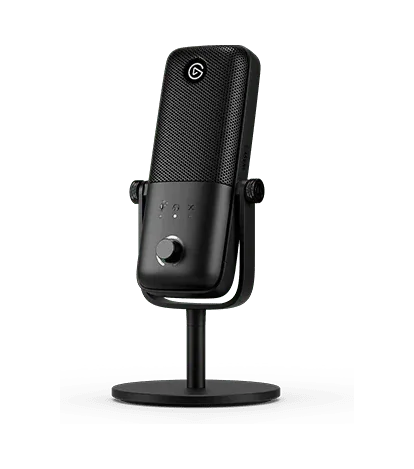
| Elgato Wave:3 MK.2 | Streamers already using Wave Link | Cardioid condenser, Auto Gain, tap-to-mute, monitoring | Placement matters with a sensitive condenser |
| RØDE NT-USB Mini | Small desks and compact setups | Built-in pop filter, magnetic base, swing mount | Fewer controls confirmed in our verified specs |
What makes a good microphone for gaming?
Gaming audio is mostly spoken voice in real time, often next to a loud keyboard, with headphones on. That shifts priorities away from studio specifications and toward practical controls. A good microphone for gaming earns its place through how easily you can position it, mute it and keep it from broadcasting your room.
Placement beats specifications
The single biggest factor in how you sound is the distance between your mouth and the microphone compared with the distance between the microphone and everything else. A modest microphone a short distance from your mouth will usually sound clearer than an expensive one sitting behind your keyboard. Mounting options, cable length and footprint therefore matter as much as the capsule.
Fast mute and headphone monitoring
Tap-to-mute lets you cut your audio without alt-tabbing out of a match. Headphone monitoring, through a jack on the microphone, lets you hear your own voice so you do not shout over game audio. Both are small features that you will use every session.
Noise processing
Onboard processing (DSP) can include automatic level control, denoising and EQ. These help in untreated bedrooms, but they are tools, not magic. Manufacturer claims about how well processing removes noise have not been independently measured for the models here.
USB versus XLR, dynamic versus condenser
XLR microphones need an audio interface or mixer, which adds cost and cables. They make sense if you already own one. For voice chat, USB keeps things simple, and for most players a good microphone for gaming is a USB one. Dynamic microphones use a coil moving in a magnetic field; condenser microphones use a diaphragm acting as one plate of a capacitor. Condensers are often more sensitive, which can mean picking up more of the room, though pickup pattern and placement change that a great deal.
Shure MV6 Gen 2: best for noisy gaming rooms

Shure positions the MV6 as a USB gaming microphone, and the Gen 2 version, announced on September 30, 2026, leans heavily on adjustable processing. It connects over USB-C and has a 3.5 mm headphone jack for monitoring, plus tap-to-mute. The processing features are the main draw: an adjustable Auto Level, an adjustable real-time denoiser and a 5-band EQ. Shure’s announcement specifies a 2-meter USB-C cable and a desktop stand in the package.
The adjustability matters for gaming. Instead of choosing between noise suppression on or off, you can set how aggressive the denoiser is, which is useful if you play with a clicky keyboard but do not want your voice to sound over-processed. The longer cable also gives more freedom on a wide desk.
Who should choose it: players in shared or noisy rooms, and anyone who wants a good microphone for gaming that they can tune rather than simply switch on.
Limitations:
- It is a new generation. Older MV6 pages list a 1-meter cable, so confirm a listing clearly says Gen 2 before relying on Gen 2 features.
- Denoiser and Auto Level effectiveness is a manufacturer claim; we have no independent measurements.
- Heavy denoising on any microphone can affect voice tone, so start low.
Elgato Wave:3 MK.2: best for Wave Link streamers

The Elgato Wave:3 MK.2 is a USB condenser microphone with a cardioid pickup pattern, meaning it is designed to favor sound from the front. Elgato lists onboard DSP, Auto Gain, tap-to-mute and headphone monitoring, along with integration with its Wave Link software.
Wave Link is the reason to pick this one. If you already route game audio, chat and music through Elgato software for streaming, the Wave:3 MK.2 slots into that workflow. For gamers who stream occasionally, that makes it a good microphone for gaming and broadcasting from the same desk. Our broader USB microphone for streaming guide covers the streaming side in more depth.
Who should choose it: players who stream or plan to, and anyone already using Elgato gear such as the cameras covered in our webcam for streaming guide.
Limitations:
- As a condenser, it rewards careful aiming. Point it at your mouth and away from your keyboard.
- Elgato’s product page compares the original Wave:3 with the MK.2. Do not assume the two share every specification or bundled accessory.
- Check that Wave Link supports your operating system before buying for its software features.
RØDE NT-USB Mini: best for a compact desk

The RØDE NT-USB Mini is the space-saving option. It has a built-in pop filter, a detachable magnetic desk base and a 360-degree swing mount, which lets you angle it toward your mouth on a small desk. It also has built-in DSP for processing through RØDE Connect.
The compact base and swing mount address a real gaming problem: getting the microphone pointed at your mouth without the base crowding your mouse area. If your desk already holds a tenkeyless keyboard and a large mouse pad, a small footprint helps.
Who should choose it: players with limited desk depth, and anyone who wants a good microphone for gaming without a large base.
Limitations:
- The NT-USB Mini is a different product from the NT-USB and NT-USB+. Check the exact model name.
- Our verified specifications do not confirm a mute control, headphone monitoring or boom-arm mounting for this model. If those matter to you, check RØDE’s current product page.
- Processing features depend on using RØDE Connect.
Gaming microphones compared side by side
Choosing a good microphone for gaming from these three comes down to controls, software and space. Where a feature is not in the specifications we verified, the table says so rather than guessing.
| Feature | Shure MV6 Gen 2 | Elgato Wave:3 MK.2 | RØDE NT-USB Mini |
|---|---|---|---|
| Connection | USB-C | USB | USB |
| Pickup pattern | Not in verified specs | Cardioid condenser | Not in verified specs |
| Tap-to-mute | Yes | Yes | Not in verified specs |
| Headphone monitoring | 3.5 mm | Yes | Not in verified specs |
| Level control | Adjustable Auto Level | Auto Gain | DSP via RØDE Connect |
| Noise processing | Adjustable real-time denoiser, 5-band EQ | Onboard DSP | Built-in DSP; built-in pop filter |
| Software | Not in verified specs | Wave Link | RØDE Connect |
| Mounting | Desktop stand, 2 m cable | Not in verified specs | Magnetic base, 360-degree swing mount |
If you mainly record long-form voice rather than chat during matches, our USB microphone for podcasting guide weighs these features differently.
Compatibility checklist before you buy
Run through this list before you pick a good microphone for gaming, especially if you use more than one computer or a console.
- Exact generation: confirm MV6 Gen 2, Wave:3 MK.2 and NT-USB Mini by name. Similar names hide real differences.
- Ports: check what cable comes with the microphone and whether your PC has a matching free port. If you rely on a hub, our USB-C hub guide explains shared bandwidth and power.
- Software support: Wave Link and RØDE Connect features only help if they run on your operating system.
- Consoles: we have not verified console support for any of these models. Check the manufacturer’s current compatibility list for your exact console.
- Two-computer desks: if a KVM switches your peripherals, check whether it passes USB audio devices as well as keyboards and mice. See our dual PC desk setup guide.
- Desk space: measure where the base will sit relative to your keyboard and mouse.
- Price: prices change; compare current listings rather than relying on old budget lists.
How to set up a USB gaming microphone: a worked example
Take a common case: a PC player with a mechanical keyboard, closed headphones and Discord, using a desk microphone for the first time. Here is how to get a good microphone for gaming sounding right in about fifteen minutes.
- Place it first. Put the microphone between your keyboard and your face, a short distance from your mouth, angled up toward you and away from the keys. On a crowded desk, an adjustable mount such as the NT-USB Mini’s swing mount helps with aiming; a separate boom arm is another general option for microphones that support one.
- Connect directly. Plug into a port on the computer itself for the first test. If you later move it to a hub and hear dropouts, go back to a direct port to isolate the problem.
- Set it as the default input. Select it in your operating system’s sound settings, then select it again as the input device in Discord and in each game’s voice settings.
- Turn on monitoring. Plug your headphones into the microphone’s jack if it has one, so you hear yourself at a natural level.
- Choose one noise tool. Use either the microphone’s processing, such as the MV6 Gen 2 denoiser, or Discord’s noise suppression, not both at full strength.
- Record a test. Record yourself talking while typing and clicking at match pace, then play it back. Adjust angle and processing until the keys sit well below your voice.
- Practise the mute. Find tap-to-mute by touch so you can use it mid-match without looking.
The rest of your desk affects the result too. A quieter keyboard reduces what even a good microphone for gaming has to fight; our budget mechanical keyboard guide and budget wireless gaming mouse guide cover peripherals for gaming desks, and our cable management guide helps route the microphone cable away from your mouse.
Common mistakes with gaming microphones
Most complaints about a good microphone for gaming come from setup rather than hardware.
- Placing it too far away. A microphone behind the keyboard hears the keyboard first. Move it closer to your mouth before changing settings.
- Stacking noise suppression. Onboard DSP plus app suppression plus a noise gate can make speech sound choppy.
- Buying the wrong generation. MV6 versus MV6 Gen 2, Wave:3 versus Wave:3 MK.2, and NT-USB versus NT-USB Mini are not interchangeable.
- Forgetting per-app input settings. Games and chat apps often keep their own device choice, so a new microphone may be ignored until you select it.
- Overspending on an XLR chain you do not need. An interface makes sense for a growing studio, not usually for party chat.
- Assuming console support. Check the manufacturer list rather than assuming any USB microphone will work.
For more audio and streaming advice, browse our streaming and audio guides or the full list of PC buying guides.
Frequently asked questions
Is a USB or XLR microphone better for gaming?
For most gamers, USB is the simpler choice. A USB microphone plugs straight into your computer and handles conversion and gain itself, so you need no audio interface or extra cables. XLR microphones need an interface or mixer, which adds cost, desk space and setup steps. XLR makes sense if you already own an interface or plan to build a larger streaming audio setup. Otherwise a capable USB mic is enough for voice chat.
Do I need a separate microphone if my headset already has one?
Not necessarily. If teammates hear you clearly and your headset mic is not picking up excess keyboard noise, there is little reason to change. A separate desk microphone helps when you want clearer voice for streaming or recording, physical controls like tap-to-mute, or software noise processing. It also frees you to choose headphones for comfort and sound rather than microphone quality, since the two no longer have to come in one product.
What is a good budget microphone for gaming?
Prices change too often for us to promise a fixed budget pick, so compare current prices yourself. Decide which features you actually need first: fast mute, headphone monitoring and noise processing matter more for gaming chat than maximum audio resolution. A cheaper microphone with good placement often sounds better than an expensive one placed beside a loud keyboard. Spend on the features you will use, then put the microphone close to your mouth.
Will these microphones work on PlayStation or Xbox?
We have not verified console support for the Shure MV6 Gen 2, Elgato Wave:3 MK.2 or RØDE NT-USB Mini, so we do not claim it. USB microphones that work on a PC do not automatically work on every console. Check each manufacturer's current compatibility list for your exact console model before buying, and confirm whether any software features you want are available on that platform.
How do I stop my microphone picking up keyboard clicks?
Start with placement: put the microphone much closer to your mouth than to your keyboard, and aim it away from the keys. Then use the noise processing your microphone or software offers, such as a denoiser or noise gate, at the lowest setting that works. Avoid stacking several suppression tools at once, as that can make your voice sound processed. Quieter switches or a desk mat can also reduce the source noise.
Is the Shure MV6 Gen 2 different from the original MV6?
Yes. Shure announced the MV6 Gen 2 on September 30, 2026, as the next generation of its MV6 USB gaming microphone. The Gen 2 announcement specifies a 2-meter USB-C cable and desktop stand, while older MV6 pages list a 1-meter cable. Because listings may mix generations, check that a product page clearly says Gen 2 before relying on Gen 2 features such as the adjustable denoiser and 5-band EQ.
Research-led guides for better PC setups. Read how we select and check gear.